Don't miss our new offer - up to 60% OFF!
Boost Outreach with the Right Email Extractor Software


Email marketing remains one of the most powerful tools for business growth. But before launching successful campaigns, you need one thing—qualified email leads. That’s where email extractor software comes in.
Whether you’re generating leads for B2B sales, networking, or digital marketing campaigns, email extractor software helps you collect email addresses from various online platforms quickly and accurately. From a Chrome email scraper to a free LinkedIn email finder extension, the right tools can make your outreach smarter and more efficient.
In this article, we’ll explore how email extractor software works, the best use cases, and how it integrates with tools like Twitter email extractor and email ID extractor from website solutions.
What Is Email Extractor Software?
Email extractor software is a digital tool that automatically scans websites, social media platforms, and online directories to find publicly available email addresses. It’s used by marketers, recruiters, entrepreneurs, and sales teams to build targeted contact lists.
Unlike manual email collection, which is slow and error-prone, email extractor software pulls emails in bulk, saving time and effort while boosting the efficiency of your outreach campaigns.
Popular formats include:
- Desktop applications
- Browser extensions (like a Chrome email scraper)
- Cloud-based SaaS tools
- API integrations for automation
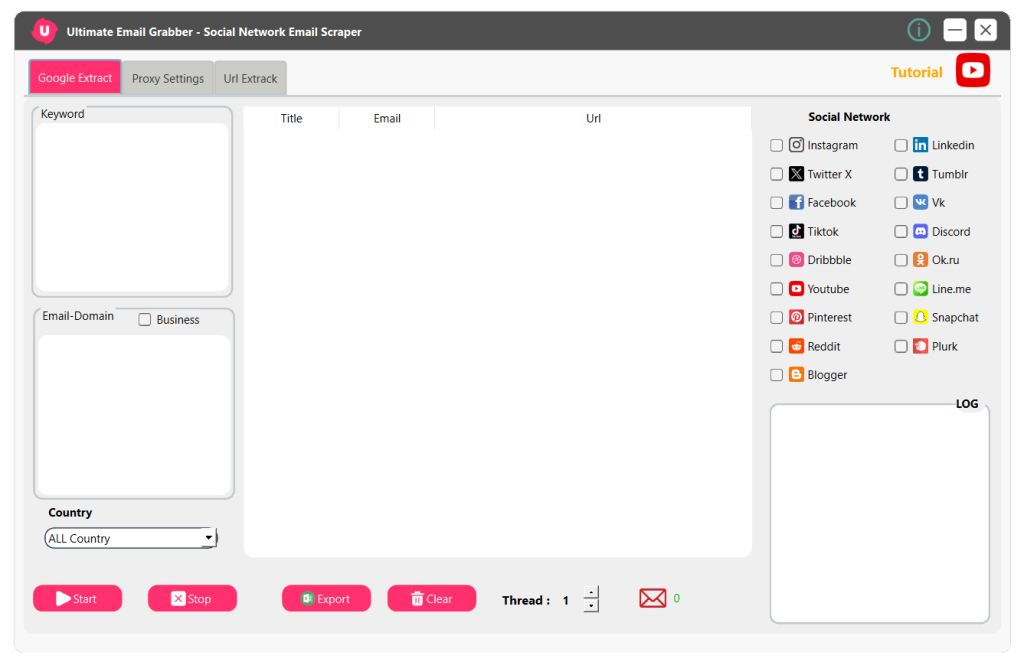
Ultimate Email Grabber
Why Use Email Extractor Software?
If your business depends on reaching new leads or building cold email campaigns, using email extractor software is a no-brainer. Here’s why it’s essential:
- Time-saving: Automates the process of finding and collecting emails.
- Scalable: Extract thousands of emails in minutes, not hours.
- Cost-effective: Great ROI compared to purchasing lists or running ads.
- Targeted: Find niche-specific leads using filters and keywords.
- Accurate: Reduces human error in manual data entry.
Pairing email extractor software with a proper CRM or outreach tool can significantly improve conversion rates and overall marketing performance.
Chrome Email Scraper for Web-Based Collection
One of the most popular formats of email extractor software is a Chrome email scraper. These lightweight extensions integrate directly with your browser and extract emails as you browse websites.
Why choose a Chrome email scraper?
- It’s fast and user-friendly.
- Works on almost any webpage.
- Allows you to extract emails while browsing competitor sites, business listings, or blogs.
- Some tools even support auto-scrolling and continuous extraction.
A Chrome email scraper is ideal for freelancers, solopreneurs, and agencies who want quick access to emails without leaving their browser.
Free LinkedIn Email Finder Extension
LinkedIn is a goldmine for B2B connections—but getting emails from it can be tricky. That’s why many professionals use a free LinkedIn email finder extension, which works in conjunction with email extractor software to find verified contact information of potential leads.
Benefits of a free LinkedIn email finder extension:
- Helps reach decision-makers directly
- Filters by industry, job title, or location
- Adds extracted emails to your CRM or database
- Often includes contact enrichment features
By integrating a free LinkedIn email finder extension with your email extractor software, you get access to high-quality, niche-relevant leads for your outreach campaigns.
Ultimate Email Grabber
Twitter Email Extractor for Social Media Lead Generation
Social media isn’t just for engagement—it’s also a great source for contact information. A Twitter email extractor is a type of email extractor software that scans Twitter bios, tweets, and linked websites to find associated email addresses.
Why marketers use a Twitter email extractor:
- Identify influencers and bloggers in specific niches
- Find emails from Twitter profiles that link to personal or business websites
- Use hashtags to filter relevant profiles
- Expand outreach beyond traditional platforms like LinkedIn or Facebook
With a Twitter email extractor, your email extractor software becomes even more versatile, unlocking social media as a direct lead source.
Email ID Extractor from Website
One of the most common use cases for email extractor software is scanning business or niche websites for contact information. An email ID extractor from website lets you input a domain or URL and get all available email addresses listed on that page.
Perfect for:
- Outreach to local businesses
- Contacting authors of blog posts
- Partnering with companies in similar niches
- Extracting emails from forum pages, portfolios, or event listings
By automating the process, an email ID extractor from website ensures your lead list is fresh and up to date without having to manually search every page.
Features to Look for in Email Extractor Software
Not all email extractor software is the same. When choosing the right tool, here are some key features to consider:
- Multi-source capability – Extract from websites, social media, directories, and more.
- Real-time extraction – Get results instantly as you browse or input domains.
- Advanced filtering – Choose domains, keywords, or platforms to narrow your list.
- Export options – Export to CSV, Excel, or sync with CRMs.
- Built-in validation – Identify fake or inactive emails before outreach.
- Custom scraping options – Some advanced tools allow custom rules and page depth control.
When a tool combines all of the above, it’s not just email extractor software—it’s a lead generation machine.
Ethical Considerations When Using Email Scrapers
Using email extractor software comes with great power—and responsibility. Always use these tools ethically and legally. Here are a few key guidelines:
- Only collect publicly visible emails.
- Respect data protection laws, like GDPR and CAN-SPAM.
- Don’t spam your contacts.
- Provide clear opt-out or unsubscribe options in your emails.
- Validate and segment your leads before outreach.
When used correctly, email extractor software can boost outreach without violating privacy or damaging your reputation.
Ultimate Email Grabber
How to Maximize ROI with Email Extractor Software
Here’s how to squeeze every ounce of value from your email extractor software:
- Pair it with a CRM like HubSpot or Pipedrive.
- Use email warm-up tools before launching outreach.
- Automate follow-ups with tools like Mailshake or Lemlist.
- Analyze response rates and A/B test your email copy.
- Combine data from multiple sources (LinkedIn, Twitter, websites) for richer profiles.
Most importantly, keep your database clean and updated. Run email verifications and prune inactive contacts regularly to improve deliverability and engagement.
Final Thoughts
In a world where attention is currency, having the right contacts is everything. With the help of modern email extractor software, businesses and entrepreneurs can build high-quality email lists quickly, ethically, and at scale.
Whether you’re using a Chrome email scraper, a free LinkedIn email finder extension, a Twitter email extractor, or an email ID extractor from website, the goal is the same: collect the right leads and turn them into customers.
The landscape is competitive—but with the right tools and strategies, you’re already ahead.